How to Make a Magic Candy Portal Video with AI
Versein Team · Updated
Start with one clear, front-facing photo where your face is easy to see: open the Magic Candy Portal template on VerseIn, add the photo, and generate. The template is built to look like a doorbell camera caught you opening a glowing portal that showers you with candy. If you still have no Halloween post planned, this one needs no costume and no props.
Key Takeaways
- Your only input is a photo. In the example, the hat, cape, wand, bucket and porch are supplied by the scene.
- Face the camera in your photo: the hint calls for a clear front-facing shot with your face visible.
- The hook is the framing: a round, fisheye doorbell-cam view of a front porch at night.
- Making it takes three steps on the template page (select the template, upload your photo, generate and post), and the finished clip is saved to your Media library.
What the Magic Candy Portal video looks like
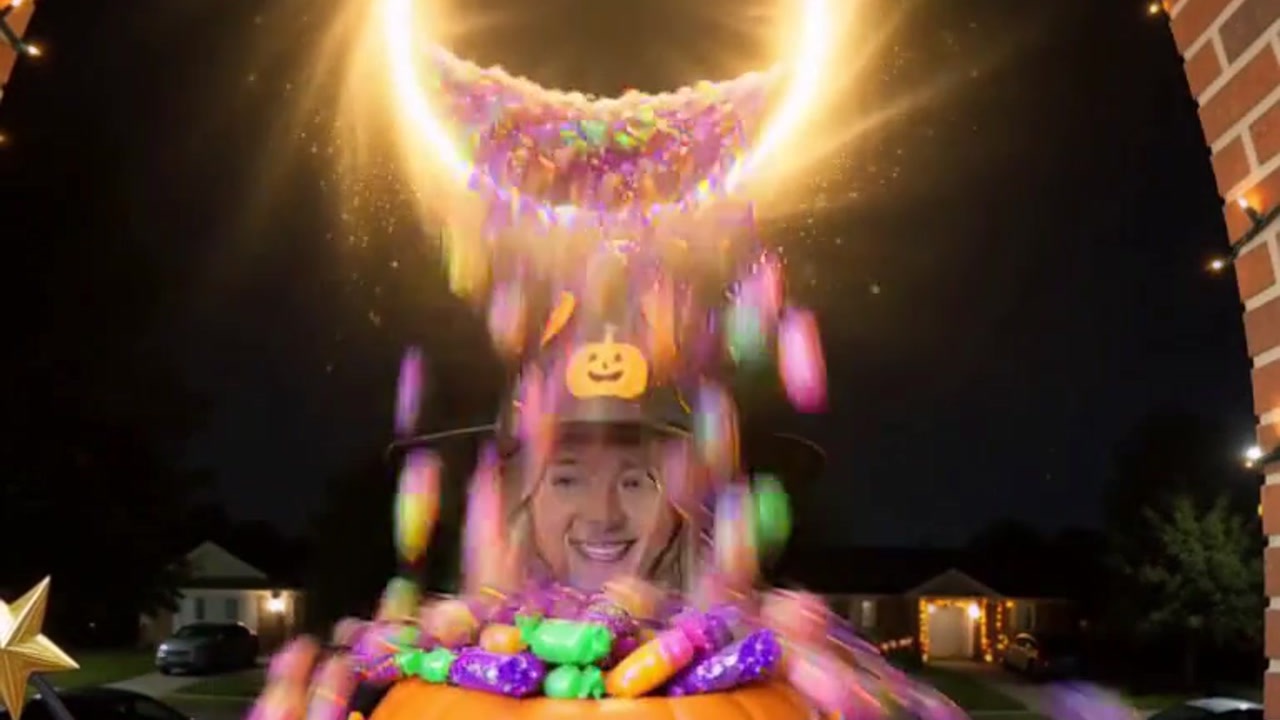
This template borrows the look of a home doorbell camera. The Magic Candy Portal template page describes it as turning your photo into doorbell-cam footage of you conjuring a glowing portal that pours out "a waterfall of candy."
The vertical example has the round fisheye shape and dark vignette edge of a porch camera. It opens on a smiling woman with shoulder-length blonde hair, wearing a black witch hat printed with pumpkins and stars and a black cape tied with a ribbon. She holds an empty orange jack-o'-lantern bucket right up to the lens. Brick porch columns hung with string lights frame her, and behind her sits a quiet street with parked cars and lit-up houses.
Next, she lifts a star-tipped wand over her head, and a golden sparkle trail arcs through the air. The bucket is now at her waist, and carved pumpkins sit on the porch steps.

Then the payoff: a ring of golden light opens above her, and wrapped candy in purple, green, pink and orange streams down into the bucket until it's heaped full. She grins through the falling candy.
What photo to upload
On the template page, the upload hint says "Upload a clear front-facing photo with your face visible." In the example, the woman faces the lens as she holds up her bucket, so a photo where you look straight at the lens fits the setup.
| Works well | Avoid |
|---|---|
| Eyes on the lens, chin level | Side profiles or a head turned away |
| Your face lit evenly and in sharp focus | Dark, grainy or blurry photos |
| You alone in the shot | Group photos or other faces in the background |
| Nothing covering your eyes or mouth | Sunglasses, masks, hoods or a hand near your face |
Want your partner or best friend on that porch instead? Ask them first, and upload their photo only once they say yes.
Make your Magic Candy Portal video in three steps
- Select this template.
- Upload your photo.
- Generate and post.
These steps are written for the VerseIn web app, which runs in your browser. Separately, VerseIn publishes apps for iOS and Android.
Step 1: Select this template
Go to the template page linked above, or find it under Festival templates. Your video needs an account to be saved to, so sign in now, or register if you don't have one.
Step 2: Upload your photo
Choose a photo that matches the "Works well" column above. Look at the photo at arm's length on your phone: if your whole face isn't instantly clear, straight on and unblocked, pick another shot.
Step 3: Generate and post
Select Generate, review the total cost shown, and confirm. When the portal has finished pouring, the result lands in your Media library, ready to share for Halloween.
Choosing a photo for the porch-cam look
Take or leave these ideas:
- Pick a smiling photo. The woman in the example smiles from the first frame and grins through the candy shower, so a happy expression may suit the scene.
- Don't chase the night look. The porch is dark, but the hint asks for a clear face. A photo taken in daylight or a bright room fits that hint better than a dim shot from outside after sunset.
- Go bare-headed. The scene brings its own witch hat in the example, so a cap or beanie in your photo adds nothing and can hide your hairline.
- Upload the unedited version. If a beauty filter or smoothing app has already reshaped your face, that edited face is the one the template starts from.
More templates to try
- Caught on Camera: Witch Crossing: another "caught on camera" format, a "real" phone clip of you floating across a crosswalk on a broomstick (Witch Crossing tutorial).
- Halloween Candy Crash: more candy, as the template drops you into a playful Halloween candy crash (Candy Crash tutorial).
- Trick or Treat: Pet Edition: your pet goes door to door for treats (pet trick-or-treater tutorial).
- Little Dark Witch: a chibi 3D witch figurine with a lantern, a black cat and a glowing castle (Little Dark Witch tutorial).
For more seasonal ideas, see 15 Halloween Photo-to-Video Templates to Try in 2026.
FAQ
How do credits work for Magic Candy Portal?
Every generation uses credits, and you'll see the total cost on screen before you confirm. If you're new, your free sign-up credits can go toward it. On a paid plan, your exports come without a watermark. If a run fails from a processing error, a timeout or a content safety check, VerseIn refunds the credits to your account. Compare plans on the pricing page.
Do I have to dress up or bring a bucket?
No costume or props are needed. The upload hint is only about your face: clear, front-facing and visible. The hat, cape, wand and bucket in the example belong to the porch scene.
Will people think it's real doorbell footage?
The doorbell-cam framing is the joke, but out of context a clip like this can look real at first glance. Saying in your caption that it's an AI Halloween edit keeps the fun clear for everyone who sees it.
The result doesn't look like me. What should I change?
Change the photo first. Swap in a sharper one where you face the camera in even light and nothing sits over your eyes or mouth, then generate again.
Make your Magic Candy Portal video
Upload one clear, front-facing photo and conjure a glowing candy portal in doorbell-cam style.