How to Make a Halloween Candy Crash Video with AI
Versein Team · Updated
Got a costume photo from this year's party or school parade? Add it, or any clear portrait, to VerseIn's Halloween Candy Crash template and hit Generate. The template is built to drop the person in your photo into a playful heap of Halloween candy.
Key Takeaways
- The upload hint names two options: a clear portrait or a costume photo. That makes it a natural home for the costume you already wore this year.
- In the example, a simple crown-and-cape outfit ends up with large pink fairy wings in front of a candy pile and glowing jack-o'-lanterns.
- Three steps on the template page (select, upload, generate and post) end with the video in your Media library.
- The example is festive rather than spooky, which suits family posts.
What the Halloween Candy Crash video looks like
The Halloween Candy Crash template page describes the idea in one line: "Drop the subject into a playful Halloween candy crash." The example is sweet and festive rather than spooky, which makes this a good pick for family posts.
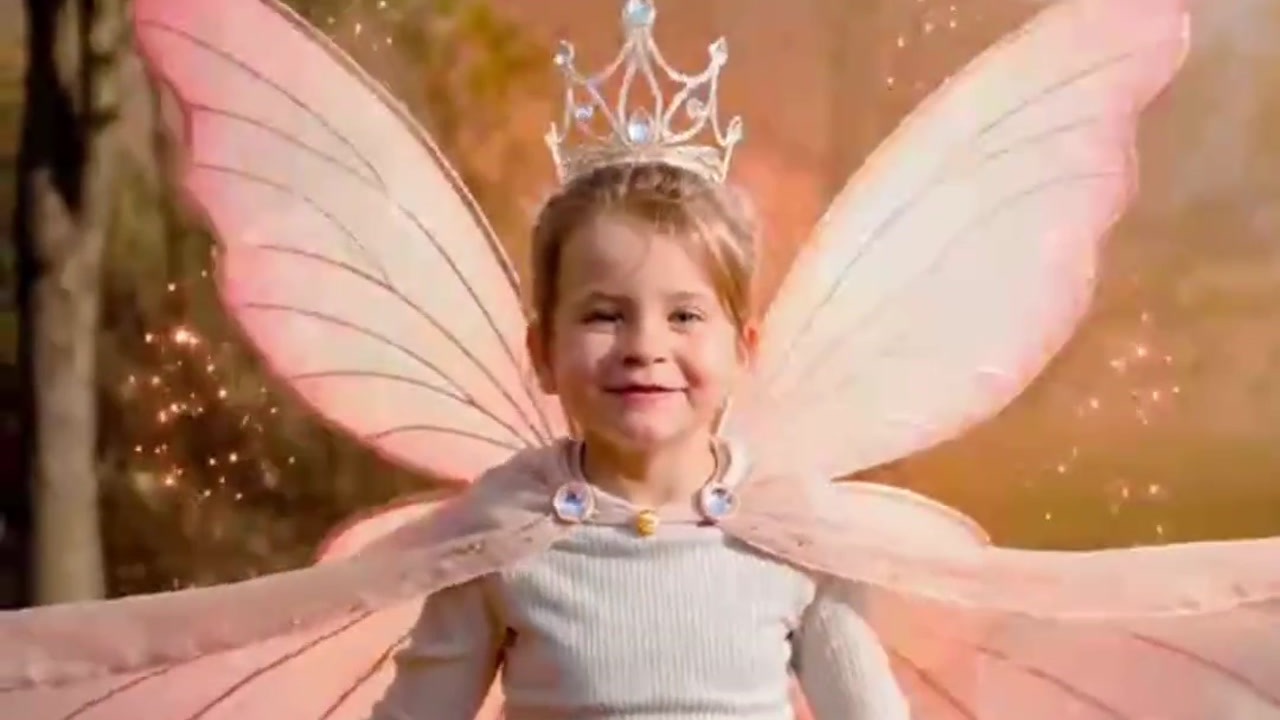
The example clip uses a 3:4 frame rather than a tall vertical one. It opens on a smiling young girl outdoors, with blurred autumn trees behind her. She wears a sparkly crown, a pale pink cape fastened with jeweled clasps and a cream knit top, and glowing sparkle trails circle around her.
A moment later, the costume has grown. She now wears large pink fairy wings and a white tulle dress, and she stands with her arms out in front of a mound of candy corn, chocolate bars and swirl lollipops. Glowing jack-o'-lanterns sit on both sides, and sparkles hang in the air.

In a later frame of the example, she sits in the candy pile itself, wings spread wide, with jack-o'-lanterns all around. The upgrade from crown and cape to full fairy wings happens in this example; other costumes may be treated differently.
What photo to upload
VerseIn's upload hint for this template is short: "Upload a clear portrait or costume photo." So you have a choice. An everyday portrait is welcome too, and so does a snapshot from the costume party or the school parade.
| Works well | Avoid |
|---|---|
| One person, clearly in focus (the example shows a solo subject) | Group shots or crowded backgrounds |
| The face and costume both in view | Masks or props covering the face |
| Good daylight or even indoor light | Dark, blurry or strongly backlit photos |
| An unedited photo | Heavy filters, stickers or text on top |
A friend's or cousin's photo needs their yes first, and a child's photo should be uploaded by a parent or guardian.
Make your candy crash in three steps
- Select this template.
- Upload your photo.
- Generate and post.
The VerseIn web app runs all three in a browser tab. Phone users can also find VerseIn on iOS and Android.
Step 1: Select this template
Head straight to the Halloween Candy Crash page from the link in the example section, or spot it in the Festival templates next to VerseIn's other seasonal looks. Log in first; newcomers can sign up on the spot.
Step 2: Upload your photo
Add the portrait or costume shot you picked. Quick check: would a friend spot the person in this photo at a glance? If the honest answer is "sort of," choose a clearer photo now.
Step 3: Generate and post
Click Generate, confirm, and VerseIn starts building your candy scene. The finished video is saved to your Media library. With Halloween only a few days away, it's a last-minute way to give a costume photo a second life before the big night.
Photo tips for a candy-filled scene
Treat these as optional:
- Show off the costume. If the outfit is the star, a waist-up or full-length shot shows much more of it than a tight face crop.
- Pick a happy moment. The example opens on a big smile, and a cheerful photo of your own may suit that mood.
- Head outside. The example opens outdoors among autumn trees, so a daylight picture from a pumpkin patch or a neighborhood walk could fit the same seasonal feel.
More templates to try
- Magic Candy Portal: doorbell-cam style footage of you conjuring a glowing portal that fills a bucket with candy. Walkthrough: Magic Candy Portal tutorial.
- Trick or Treat: Pet Edition: send your pet out trick-or-treating. Walkthrough: pet trick-or-treater tutorial.
- Werewolf? More Like Werepup: a full-moon werewolf transformation that ends with a tiny wolf cub.
Looking for more ideas? Browse 15 Halloween Photo-to-Video Templates to Try in 2026.
FAQ
How do credits work for the Candy Crash template?
Making the video uses credits, and the total cost appears before you confirm. New to VerseIn? Your free sign-up credits can count toward the cost. Watermark-free exports come with paid plans. If a processing error, a timeout or a content safety check stops the video from finishing, VerseIn returns those credits on its own. See what each plan includes on the pricing page.
Do I need to be wearing a costume?
No. The hint accepts either a clear portrait or a costume photo. A costume photo is simply an easy way to reuse the outfit you already put together.
Will my costume turn into fairy wings?
Not necessarily. Fairy wings appear in the example, where the starting outfit was a crown and a pink cape. The official description promises a playful candy crash, not a specific outfit change.
What if the result doesn't feel right?
Pick another photo and generate again. A sharper shot of one person in better light is an easy change to try.
Make your Halloween Candy Crash video
Upload a clear portrait or costume photo and drop it into a playful pile of Halloween candy.