How to Make a Little Dark Witch Video with AI
Versein Team · Updated
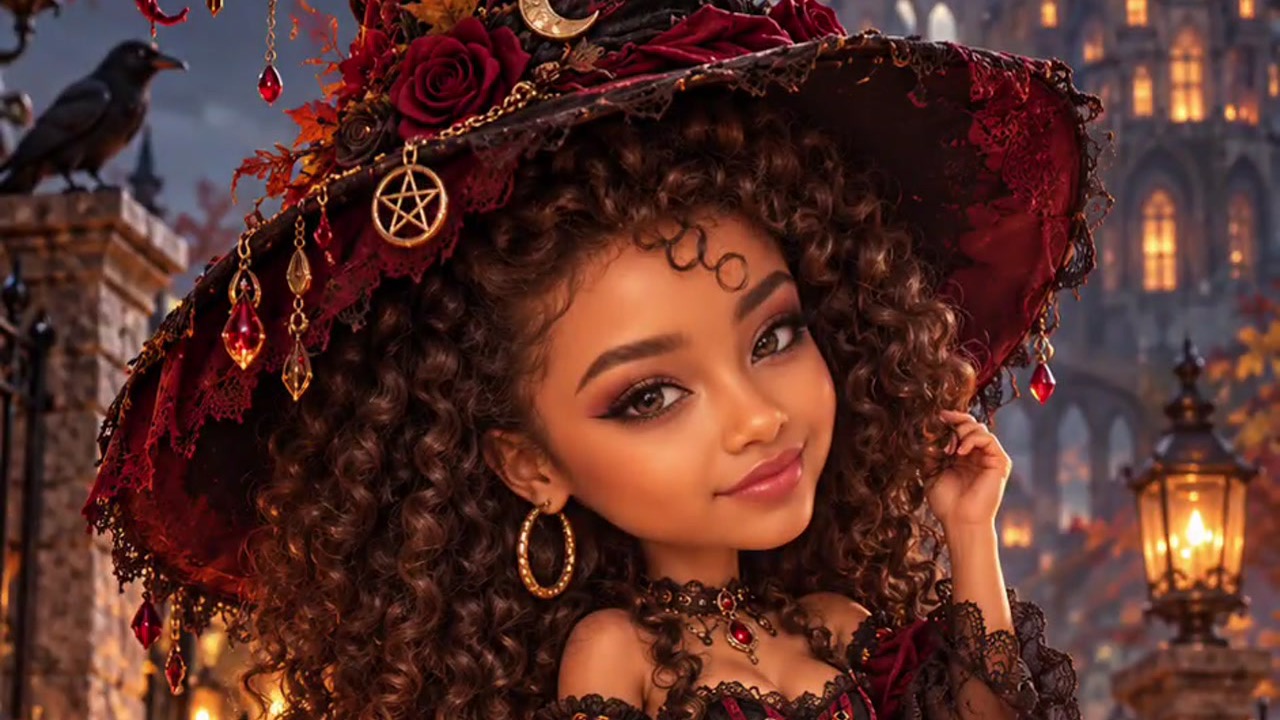
To make a Little Dark Witch video, open the Little Dark Witch template on VerseIn, upload a clear front-facing photo that shows your face and hairstyle, and generate. The template is built to turn you into a chibi 3D witch figurine. With Halloween almost here, it's a quick option if you want a post that feels cute instead of creepy.
Key Takeaways
- You bring only your photo. In the example, everything else, from the rose-covered hat to the kitten and the castle, comes with the scene.
- The upload hint asks for a clear front-facing photo with your face and hairstyle visible. Hair counts here, since the figurine in the example has a big, detailed hairdo.
- The look is closer to a collectible toy than a horror scene, which suits anyone who'd rather skip the scares.
What the Little Dark Witch video looks like
According to the Little Dark Witch template page, your photo becomes a chibi 3D witch figurine with a lantern in hand, a black cat at her feet and a castle glowing in the background.
The vertical example opens on the full figure: a young woman with big eyes and long dark curls under an enormous black-and-crimson witch hat decorated with roses, a crescent moon, a small skull and dangling red gems. She wears a crimson-and-black lace corset dress, striped stockings and chunky platform boots, and holds a brass lantern with a lit candle.

A fluffy black kitten with amber eyes sits beside her boots. Around them, a wet cobblestone street is scattered with red leaves and lined with jack-o'-lanterns, while ravens perch on stone pillars and a gothic castle glows under a full moon.
Partway through, a fast radial zoom blur rushes through the frame. When it clears, the figurine has a new pose: she smiles, one hand touching her curls, with the lantern lowered. The kitten now wears a red bow, and bats fly across the moon.
What photo to upload
Little Dark Witch's upload hint says: "Upload a clear front-facing photo with your face and hairstyle visible." The hairstyle part matters: in the example, the hair is one of the figurine's most noticeable features, so give the template a full view of yours.
| Works well | Avoid |
|---|---|
| Facing the camera, whole face in view | Profile shots or your face angled to one side |
| Your full hairstyle inside the frame | Tight crops that cut off the top or sides of your hair |
| Hair uncovered and visible | Caps, hoods or scarves hiding your hair |
| Even light, sharp focus, only you | Dim, blurry or backlit shots, or group photos |
If the tiny witch is going to be your sister or a friend, get a yes from her first. It's her face going into the template.
How to make your Little Dark Witch video in three steps
- Select this template.
- Upload your photo.
- Generate and post.
The VerseIn web app handles all three from any browser. VerseIn also makes apps for iOS and Android.
Step 1: Select this template
Open the Little Dark Witch template page, or browse to it in the Festival templates. Log in first, or make an account if you don't have one, because finished clips are saved to your Media library.
Step 2: Upload your photo
Upload your chosen photo. Before you upload, look at the edges of the photo: your whole hairstyle should sit inside the frame, with nothing trimmed off at the top.
Step 3: Generate and post
Select Generate, then confirm. The tiny witch you get back is stored in your Media library until you're ready to share her.
Photo tips for your mini witch
Optional, but worth a look:
- Wear your hair the way you like it most. The example figurine has long, full curls, so a photo where your hair is down and styled may give the template more to work with.
- Try a smile. The figurine smiles in the second half of the example, so a friendly expression in your photo may sit naturally with that pose.
- Go unfiltered. If an app has already smoothed your skin or slimmed your face, that edited version is what the figurine starts from.
More templates to try
- Autumn Witch: a broomstick flight in orange tulle above a glowing fairytale town.
- Potion Gone Wrong: a witch gulps a glowing potion and shrinks into a tiny bat.
- My Shadow Has Plans: billed on its template page as a shadow that grows a witch hat and wings and waves hello on its own (walkthrough in the My Shadow Has Plans tutorial).
Like the figurine style but want it outside Halloween? The 3D figurine tutorial covers another way to become a collectible. For a wider list of seasonal looks, see 15 Halloween Photo-to-Video Templates to Try in 2026.
FAQ
Does the Little Dark Witch template cost credits?
Yes. VerseIn lists the total cost before you confirm anything, and every generation uses credits. If your account is new, its free sign-up credits can help pay for it. Paid plans remove the watermark from exports. A failed generation, whether from a processing error, a timeout or a content safety check, gets its credits back automatically. Plans are compared on the pricing page.
Will the figurine look exactly like me?
Think of it as a playful mini version of you, not a lifelike portrait: the template is built as a stylized chibi figurine, and in the example that means toy-like proportions and oversized eyes. A sharp, front-facing photo with your hair fully visible gives the template a clear look at your face and hairstyle to start from.
Is Little Dark Witch scary?
Not in the example. It has jack-o'-lanterns, ravens and bats, but the big-eyed figurine and the fluffy kitten keep the mood sweet rather than frightening.
Make your Little Dark Witch video
Upload one clear front-facing photo with your hair in view and become a tiny 3D witch for Halloween.