How to Turn Yourself into a 3D Figurine with AI
Versein Team · Updated
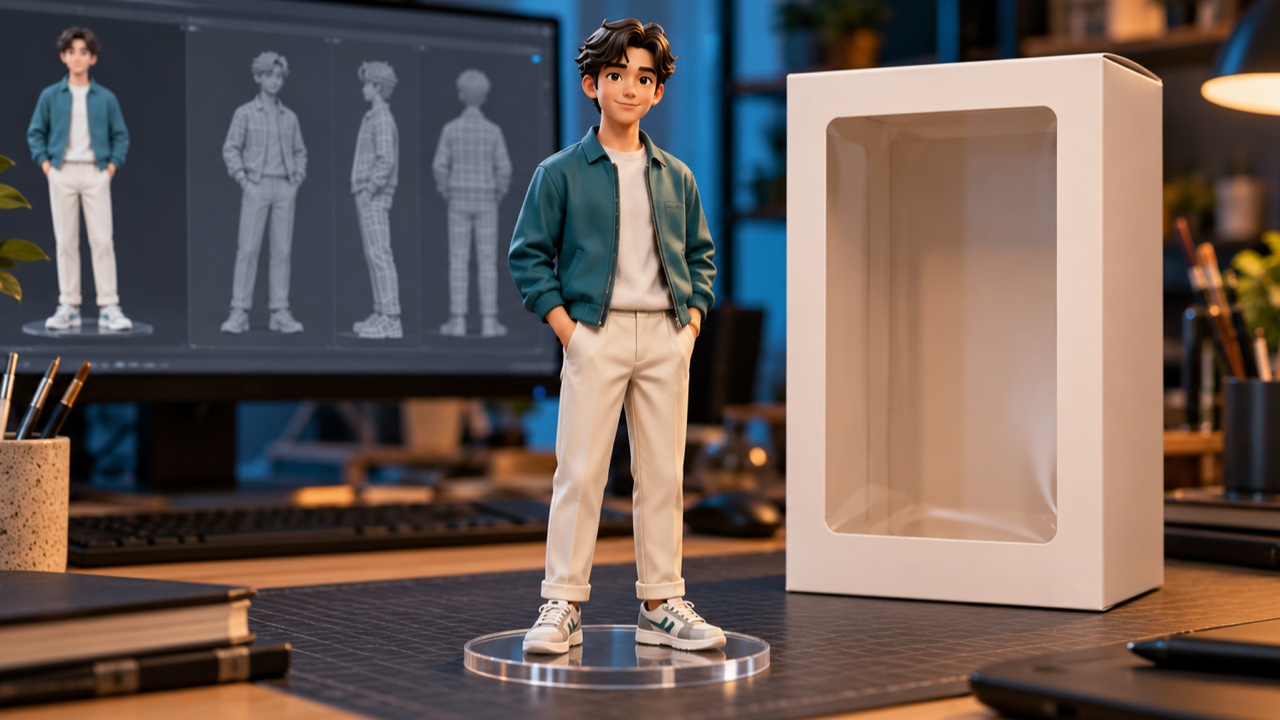
To turn yourself into a 3D figurine with AI, open the 3D Figurine Factory template on VerseIn, upload a clear full-body photo of yourself in a simple pose, and press Generate. In the example clip, the person ends up as a small collectible on a display base, with a retail box standing beside it. What you get is a video for your feed; no figure is made or shipped.
Key Takeaways
- You supply one full-body photo. In the example, the desk, display base, screen and box all come from the template.
- Show your whole body and keep the pose simple, as the upload hint asks.
- Making it takes three steps: pick the template, add your photo, press Generate.
- The finished video lands in your Media library. Nothing physical is produced.
What the 3D Figurine Factory video looks like
The template takes the idea of a collectible figure of yourself on your desk and turns it into a reveal. The 3D Figurine Factory template page sums it up as building the subject into a boxed 3D figurine, shown as a factory-style reveal.

In the example, a woman with long black hair, a glossy silver bodysuit and silver heeled boots first walks along a bright city street, with thin glowing blue lines running up and down around her. Later in the clip, the same character stands as a small figurine on a clear round base on a wooden desk. Behind her, a monitor shows a gray 3D model of the figure, and a retail box with her picture on the front sits to one side. Toward the end, the figurine has turned slightly sideways.
What photo to upload
The template asks you to "upload a clear full-body portrait in a simple pose." Since the figurine appears as a whole standing figure on its base, your photo should cover you from head to toe. A simple pose gives the template a clean outline to build from.
| Works well | Avoid |
|---|---|
| One person, head to toe | Group shots, or framing that stops at the waist or knees |
| Standing upright, arms relaxed and slightly away from your sides | Jumping, sitting, crouching or crossed limbs |
| Even light from head to shoes | One half of you in shadow, or a blurry shot |
| Your everyday look, no edits | Filters that reshape your body |
Turning a friend or partner into the collectible instead? Ask them before you upload, because the figure in the box will wear their face.
How to make the video, step by step
- Select the 3D Figurine Factory template.
- Upload your photo (click on the web, tap in the app).
- Generate and post.
On a computer, you can do this in the VerseIn web app. On a phone, the VerseIn app for iOS or Android works too.
Step 1: Select the 3D Figurine Factory template
Open the 3D Figurine Factory template to go straight to it, or look for it among the trending templates. First time on VerseIn? Signing up comes first, so the reveal has a Media library to land in.
Step 2: Upload your photo (click on the web, tap in the app)
Upload a head-to-toe shot that fits the left column of the table. In the preview, make sure your head and both feet sit inside the frame. If your shoes are cut off, swap the photo before you generate.
Step 3: Generate and post
The factory build begins once you click or tap Generate and approve the prompt that follows. Your figurine reveal is saved to your Media library, ready to post.
Tips for picking your photo
The photo is the easiest thing to adjust if the first result isn't what you pictured. A few ideas to try:
- Get your shoes in the shot. The example character wears silver heeled boots, so a photo that includes your footwear gives the template that detail to work with.
- Give your arms some room. A small gap between your arms and body may keep your outline easier to read.
- Dress for the shelf. The example sticks to one bold outfit, so pick clothes you'd be happy to see on a collectible.
- Stand against something plain. A bare wall behind you keeps attention on your silhouette.
More templates to try
- Figurine Me Up!: a collectible action-figure reveal; its upload hint asks for a full-body portrait of one person.
- 3D Figurine: a separate template from 3D Figurine Factory, where golden magic turns your selfie into a chibi doll resting on someone's open palm.
- Turn Us Into Toys: gives each person's real face its own collectible toy body.
More ways to shrink yourself are gathered in the Mini-Me AI video templates roundup.
FAQ
Do I get a real figurine I can hold?
No. The template produces a video of you as a boxed collectible. Nothing is printed, molded or mailed.
Is the 3D Figurine Factory template free?
Generating it costs credits, and before anything starts you'll always see the total cost and choose whether to confirm. If your account is new, the free sign-up credits are yours to use toward it. Paid plans export without a watermark. Should a generation fail from a processing error, a timeout or a content safety check, the spent credits return to your balance automatically. The pricing page lists the plans.
Can I turn a group of friends into figures?
This template's hint asks for a full-body portrait and doesn't mention groups, so a solo photo is the safer choice. For friends, try Turn Us Into Toys: its upload hint accepts one person or a group of up to 3-4, with every face clearly visible.
What if my figurine doesn't look like me?
Start with the photo. Pick one where you're standing still, sharply focused and fully in frame down to your shoes, then run the template again.
Make your 3D Figurine Factory video
Upload one clear full-body photo and see yourself become a boxed collectible standing on a desk.