How to Make a 'Scared of Myself' Halloween Video
Versein Team · Updated
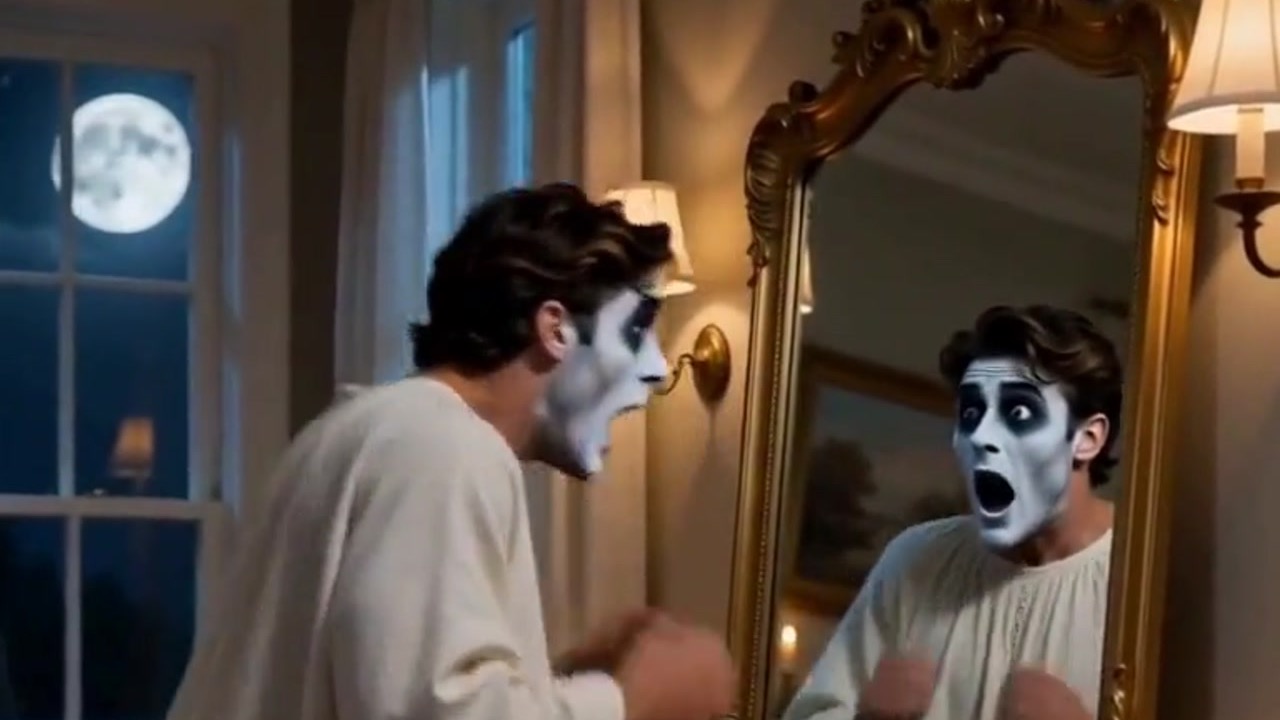
To make a "Scared of Myself" Halloween video, pick the Scared of Myself template on VerseIn, add a clear front-facing photo of your face, and press Generate. The template casts you as a small ghost who drifts through a wall, catches sight of itself in a mirror and panics at what it finds there.
Key Takeaways
- Your photo supplies only the face; the ghost, the graveyard, the candlelit room and the mirror come from the template.
- The upload hint asks for a clear, front-facing photo with your face visible. Follow it closely, because the joke lands on your face.
- Making it takes three steps: pick the template, add your photo, then generate.
- The finished clip is saved to your Media library, ready to post.
What the Scared of Myself video looks like
The clip plays like a three-beat Halloween gag. The Scared of Myself template page sums it up as your photo turned into a little ghost who flies through a wall, spots its own reflection and completely loses it.

The example opens outdoors, as the ghost sails past a stone wall in a foggy graveyard, arms out and grinning, with a full moon overhead and candles glowing between the headstones. Next it glides into a candlelit living room and heads for a tall mirror in a gold frame, where its painted face shows up in the glass.
It ends on the joke. The ghost stops in front of the mirror with its mouth hanging open, and the reflection screams right back. That ending makes the clip a comedy rather than a scare, so it suits creators who like poking fun at themselves.
What photo to upload
The hint on the template reads "Upload a clear front-facing photo with your face visible." The scene closes on your shocked face and its reflection, so pick a photo that shows your whole face head-on.
| Works well | Avoid |
|---|---|
| Facing the camera, eyes toward the lens | Profiles or a face turned well to one side |
| Even light across your face | Deep shadows, backlight or dim party lighting |
| Only you in the picture | Friends, pets or posters with faces behind you |
| Forehead, eyes and mouth uncovered | Hoods, sunglasses, masks or hands near your face |
Planning to make a friend or sibling the frightened ghost instead? Get their OK before their photo goes in.
How to make the video, step by step
- Select the Scared of Myself template.
- Upload your photo (click on the web, tap in the app).
- Generate and post.
You can follow these steps in a browser with the VerseIn web app, and they work the same way in the VerseIn app on iOS or Android.
Step 1: Select the Scared of Myself template
Open the template page linked above, or find it in the festival templates. New to VerseIn? Make an account before you add your photo.
Step 2: Upload your photo
Before uploading, check that your eyes, nose and mouth are all in plain view in the original photo. If a strand of hair or a shadow is in the way, choose another photo before you generate.
Step 3: Generate and post
Hit Generate, then confirm. Once the ghost has had its fright, the clip is saved to your Media library, ready to post.
Photo tips for a funnier reaction
A few optional ideas for a photo that suits the gag:
- Start relaxed. The ghost is smiling as it floats in, so a friendly, easygoing expression may set up the fright better than a stern one.
- Skip harsh overhead lights. Ceiling lights at a party can leave dark patches under your eyes, and the mirror close-up would show them.
- Use a recent photo. The joke is about meeting yourself, so a picture that looks like you today may make the reflection feel more personal.
- Leave beauty filters off. Smoothing or reshaping effects change your features, and the punchline may land better when the reflection still looks like you.
More Halloween templates to try
- Werewolf? More Like Werepup: another switcheroo joke, where the full-moon werewolf turns out to be a tiny cub.
- Caught on Camera: Witch Crossing: a prank-style clip made to look like real phone footage of you on a broomstick.
- My Shadow Has Plans: this time your shadow misbehaves, picking up a witch hat and wings and waving without your say-so.
- Potion Gone Wrong: slapstick of a different kind, where one gulp of glowing potion leaves a witch as a tiny bat.
Werepup and Witch Crossing each have a walkthrough of their own: the Werewolf to Werepup tutorial and the Witch Crossing tutorial. More seasonal looks are collected in 15 Halloween Photo-to-Video Templates to Try in 2026.
FAQ
Is the Scared of Myself template free?
It runs on credits, and you'll always see the total cost before you confirm. Brand-new accounts start with free sign-up credits you can use toward it. Should a generation fail from a processing error, a timeout or a content safety check, the credits return to you automatically. On a paid plan, exports come without a watermark. The pricing page has the plan details.
Do I need ghost makeup or a costume in my photo?
You don't need to. The template turns your photo into the little ghost, so an everyday picture is a fine starting point as long as your face is clear.
What if the ghost doesn't look like me?
Try another photo. A sharper shot taken square to the camera in even light may give the template more of your face to work with.
Make your Scared of Myself video
Upload one clear, front-facing photo and become a little ghost spooked by its own reflection.