How to Make a Pumpkin Slayer Video with AI
Versein Team · Updated
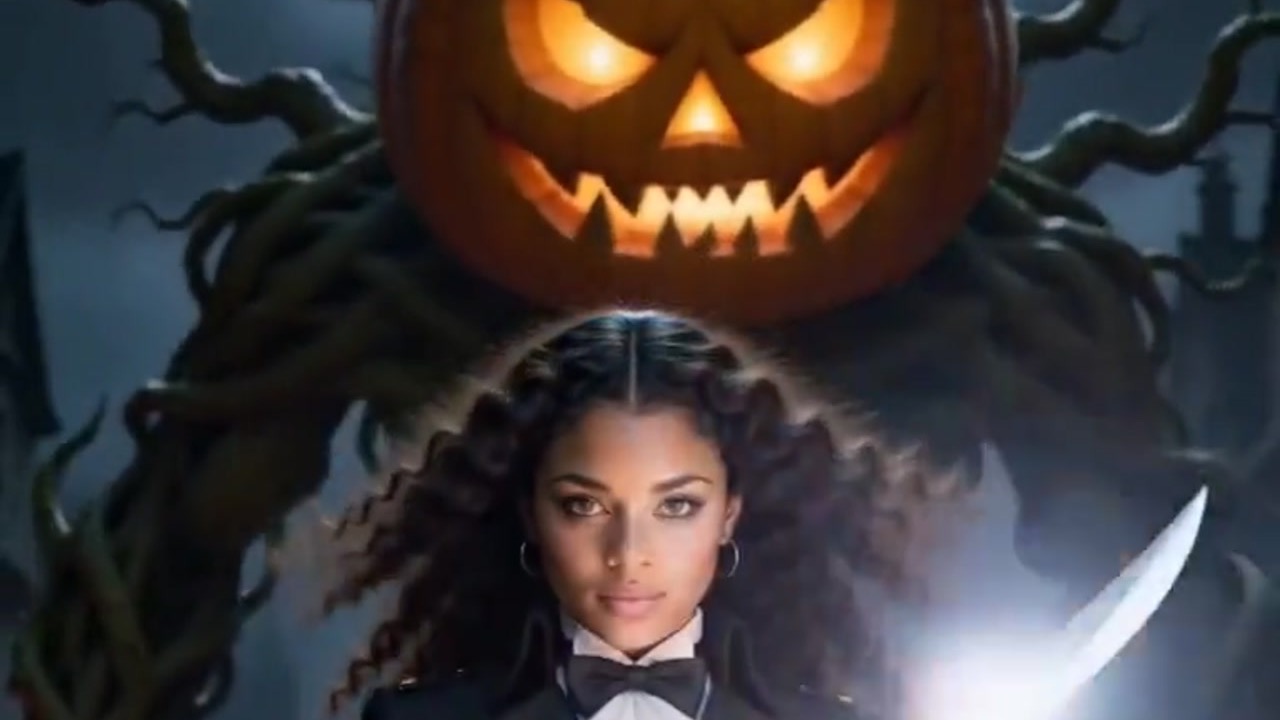
A Pumpkin Slayer video starts from a single photo. Choose the Pumpkin Slayer template on VerseIn, add a clear shot where your face shows, ideally framed from the waist up or head to toe, then hit Generate. The template casts you as a monster hunter who lights a sword on fire and cuts a pumpkin giant in two.
Key Takeaways
- Your photo is the only upload. The template supplies the hunter scene, the burning blade and the pumpkin giant.
- The upload hint asks for a clear photo with your face visible and says upper or full body works best.
- So pick a photo that shows more than your face.
- Select the template, upload your photo and generate. The finished clip is saved to your Media library, ready to post.
What happens in the Pumpkin Slayer clip
Picture a Halloween monster-movie trailer with you in the lead role. The Pumpkin Slayer template page sums it up as a monster hunter who sets their blade on fire and splits a pumpkin giant in two.
The example clip opens on a woman with long curly hair in a dark, gold-buttoned coat with a white lace jabot and bow tie. She holds a curved sword with a glowing blade, while a huge carved jack-o'-lantern head and twisted, tree-like roots loom behind her and jack-o'-lanterns line a stone path.
Midway through, the camera is behind the hunter as she leaps and strikes down into the giant's pumpkin head, which bursts with light and small grinning pumpkins. A later frame shows the standoff below.

Which photo suits a monster hunter
The template's hint reads: "Upload a clear photo, face visible (upper or full body works best)." Nothing in it says you must face the camera head-on, so a slightly turned pose is worth a try as long as your face stays visible. In the example clip, the hunter appears from head to boots, and a waist-up or full-length photo matches what the hint says works best.
| Works well | Avoid |
|---|---|
| Upper-body or full-body framing | Close crops that stop at the chin |
| Your face clear and in focus | Dark glasses, a Halloween mask or bangs covering your eyes |
| Just you (the example shows one hunter, so solo is safer) | Groups, or other people standing close by |
| Good, even light | Dark, blurry or heavily filtered shots |
Casting a friend or your sister as the slayer? Get their OK first, since it's their face going into the video.
Making a Pumpkin Slayer video in three steps
- Select the Pumpkin Slayer template.
- Upload your photo (click on the web, tap in the app).
- Generate and post.
Either route works: a browser with the VerseIn web app, or the VerseIn app on an iOS or Android phone.
Step 1: Select the Pumpkin Slayer template
The template link above opens it directly. You'll also find it among the festival templates, next to VerseIn's other seasonal picks. No account yet? Sign up before you begin, because your finished clips are kept in your account's Media library.
Step 2: Upload your photo (click on the web, tap in the app)
Use a photo that passes the table check. Before moving on, confirm that your face is visible and that the shot reaches at least your waist. A close-up selfie is the one to replace at this point.
Step 3: Generate and post
Hit Generate, then confirm to start. When the pumpkin giant has been split, your clip is saved to your Media library, ready to post for Halloween.
Photo ideas for a monster-hunter look
Some ideas for choosing or taking a photo for a fight scene:
- Pick a confident shot. Standing straight with your shoulders back gives you a photo that feels like a lead role. The template sets the hunter's moves, so this only shapes the photo you start from.
- Leave room in the frame. Keep your head and shoulders, or your head and feet, fully inside the picture with a little space around you.
- Try a determined expression. A focused look could suit a hunter facing down a giant, though a grin works if you want a lighter take.
Other Halloween templates with a story
- Werewolf? More Like Werepup: a werewolf transforms under the full moon and ends up a tiny wolf cub.
- Caught on Camera: Witch Crossing: phone-style "real" footage of you riding a broomstick over a crosswalk.
- Vampire Awakening: a gothic scene where glowing ice-blue eyes open and fangs come into view.
- Stop-Motion Me: you remade as a handmade gothic puppet, set in a fairytale town by moonlight.
For two more story templates with a twist, follow the Werewolf-to-Werepup tutorial or the Witch Crossing tutorial. More monster-movie ideas for the season are collected in the Halloween photo-to-video roundup.
FAQ
Does the Pumpkin Slayer template cost anything?
It runs on credits: every generation spends them, and you always see the total cost before you confirm. If you're new, your account starts with free sign-up credits you can use toward it. On a paid plan, exports carry no watermark. Should a generation fail, whether from a processing error, a timeout or a content safety check, the credits come back to you automatically. The pricing page lists the plans.
Do I need a costume or a prop sword?
There's nothing to bring: the template provides the flaming blade and the pumpkin giant. The upload hint doesn't mention clothing. It asks for a clearly visible face, and upper or full body works best.
What if my monster hunter doesn't look like me?
Swap in a photo that follows the hint more closely: more of you in the frame, from the waist up or head to toe, with your face sharp and evenly lit.
Make your Pumpkin Slayer video
Upload one clear photo and take on a pumpkin giant with a flaming blade this Halloween.