How to Make a 'My Shadow Has Plans' Halloween Video
Versein Team · Updated
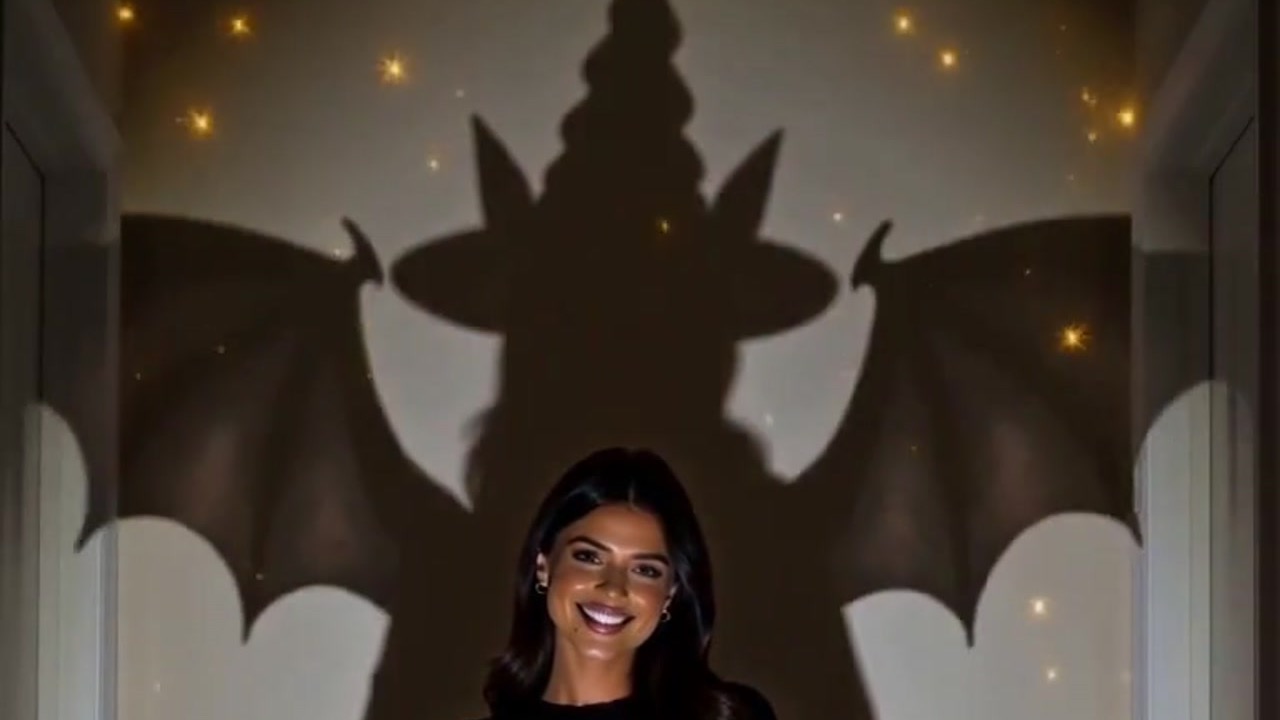
To make a "My Shadow Has Plans" video, open the My Shadow Has Plans template on VerseIn, upload a clear photo with your face visible (ideally one that shows your upper body), and generate. The template is built to keep you looking like your everyday self while the shadow behind you grows a witch hat and wings (bat wings, in the example). Still no Halloween costume? This template doesn't need one.
Key Takeaways
- One photo is all you upload, no costume or props. In the example, the hallway, jack-o'-lantern and winged shadow are supplied by the template.
- The upload hint asks for a clear photo with your face visible and adds that upper body works best.
- The humor is low-key. In the example, the woman keeps smiling while her shadow quietly turns into a witch.
- The template page lists three steps: select it, upload a photo, generate and post. Your Media library keeps the finished video.
What the My Shadow Has Plans video looks like
The joke is that you look completely normal and your shadow does not. The My Shadow Has Plans template page describes it as a Halloween moment where your shadow grows a witch hat and wings and "waves hello on its own."
The vertical example on the template page opens in a dim hallway between two white doors. A smiling woman with long dark hair stands with her hands at her waist, dressed in an oversized black sweater and black jeans. A spotlight on the wall behind her casts a perfectly ordinary shadow, and a glowing jack-o'-lantern sits on the floor in front of her.
Then the shadow changes its mind about being ordinary.

The shadow now wears a tall pointed witch hat, and huge bat wings spread almost wall to wall, with small golden sparkles drifting around them. The woman holds the same pose: same smile, hands still at her waist. Later in the example, she raises one hand and waves at the camera, with the hat-and-wings shadow still looming behind her.
What photo to upload
The hint on the template page is short: "Upload a clear photo with your face visible (upper body works best)." The part in parentheses is the useful detail, so frame the shot wide enough to show your shoulders and torso, not just your face.
| Works well | Avoid |
|---|---|
| Head, shoulders and torso in the frame | Close-up selfies cropped at the chin |
| Your whole face in clear view | Shades, a face mask or bangs falling over your eyes |
| Only you in the photo | Group shots or people standing behind you |
| A crisp shot in soft, steady light | Motion blur, a dim room or a bright window behind you |
Your regular clothes are fine; the witch look belongs to the shadow.
Want a coworker's shadow to be the one with plans? Ask them first, and upload their photo only after they say yes.
How to make the video in three steps
- Select this template.
- Upload your photo.
- Generate and post.
A browser is all you need, since the steps run in the VerseIn web app. VerseIn publishes iOS and Android apps too.
Step 1: Select this template
The template page linked earlier is the quickest route, and the template is also listed under Festival templates. You'll need an account, new or existing, because the result is saved to your Media library.
Step 2: Upload your photo
Upload the shot you chose, ideally one that fits every row in the left column of the table. One quick check before you continue: can you see your face clearly, and does the photo show more than just your head? If not, swap in a different photo now.
Step 3: Generate and post
Click Generate and confirm. When your shadow has finished making its plans, the video is saved to your Media library, and it's yours to post.
Photo tips for the shadow scene
None of these are required. They're ideas for choosing a photo that fits the story:
- Keep the outfit simple. The example uses plain dark clothes, which leaves the attention on the shadow. A busy pattern might compete with it.
- Look innocent. The woman in the example keeps a calm smile, as if she has no idea what's happening on the wall. A relaxed, cheerful photo suits that "who, me?" feel.
- Skip the filters. Face-smoothing or color filters change your features before the template starts, and the joke depends on friends recognizing the person in front of the shadow.
More templates to try
- Candlelight Witch: a moody portrait by candlelight, with a giant witch shadow looming on the wall.
- Scared of Myself: a Halloween scare starring you (walkthrough in the Scared of Myself tutorial).
- Little Dark Witch: you as a chibi 3D witch figurine with a lantern and a black cat (see the Little Dark Witch tutorial).
- Potion Gone Wrong: a witch gulps a glowing potion and becomes a tiny bat.
To see more options side by side, browse 15 Halloween Photo-to-Video Templates to Try in 2026.
FAQ
Does My Shadow Has Plans use credits?
It does. Credits are spent when you generate, and VerseIn shows the full cost before you confirm. New accounts start with free sign-up credits, and those count toward the cost. Paid plans export without a watermark. A generation that fails from a processing error, a timeout or a content safety check gives the credits back to your account on its own. You'll find plan details on the pricing page.
Should I dress up for the photo?
No. In the example, the person wears everyday clothes and only the shadow gets the witch hat and wings.
Does the shadow really wave on its own?
That's how the template page describes it. In the example frames, the woman raises her hand and waves at the camera while the winged shadow stays on the wall behind her.
My result doesn't look much like me. What should I change?
Swap in a different photo. The strongest candidates match the hint closely: a sharp shot, nothing covering your face, and your shoulders and torso inside the frame.
Make your My Shadow Has Plans video
Upload one clear photo with your face visible and let your shadow grow a witch hat and wings this Halloween.